Skip to content
Menu Close

What Is a Zigbee Wall Switch and How Does It Work?

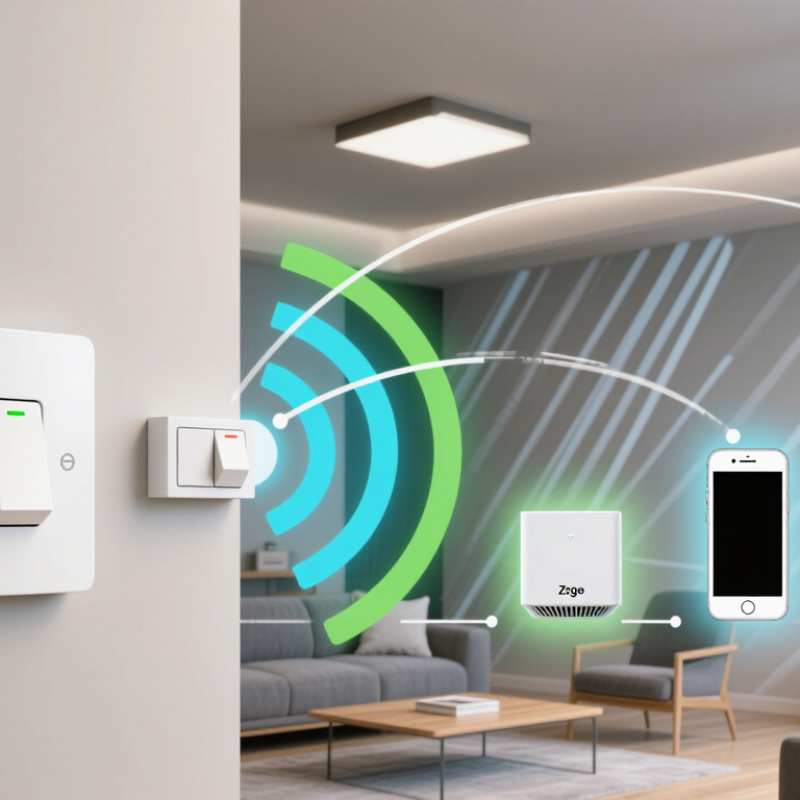
A Zigbee Wall Switch is a smart control device that replaces, or works beside, a traditional light switch. It communicates through the Zigbee wireless protocol rather than relying on Wi-Fi for every command. In a typical home, the switch connects to a Zigbee hub, which links it with an app, voice assistant, or home automation system. Pressing the switch sends a small radio signal. The hub then activates the connected light, scene, or routine.

The experience feels simple.

Behind the wall, several details matter. Some models require a neutral wire, while others are designed for older wiring. Checking the manufacturer’s wiring diagram is essential. A qualified electrician should handle uncertain electrical connections. Zigbee devices can also form a mesh network, allowing powered devices to pass signals across rooms. This can improve coverage, although thick walls, metal boxes, and interference may reduce performance. The system may not respond perfectly on the first attempt.

Compatibility deserves careful attention. A Zigbee Wall Switch may support one hub but fail to pair with another because brands use different profiles or software features. Before buying, confirm the hub, voltage, load type, and lamp compatibility. Real-world setup can be less tidy than product images suggest. Firmware updates, reset procedures, and local control options also influence reliability. Good installation includes testing manual operation, app control, and recovery after a network outage. Zigbee is efficient and practical, but it is not magic. Understanding its limits helps homeowners choose a safer, more dependable smart lighting solution.
What Is a Zigbee Wall Switch and How Does It Work?

What Is a Zigbee Wall Switch?

A Zigbee wall switch is an in-wall control that operates lights through a low-power wireless network. It usually contains a physical button, a radio module, and an electrical relay. When you press the paddle, the relay changes the circuit’s state. The switch then sends a Zigbee command to a coordinator or compatible hub. In practical use, the lamp may respond before you reach the doorway. That small delay matters.

Unlike a simple wireless button, many Zigbee wall switches also control mains electricity directly. Some models require a neutral wire, while others support older wiring systems. A neutral-free design can be useful, but it may need a minimum lamp load. Otherwise, LEDs may flicker or remain faintly lit. Installation should follow local electrical rules and be completed by a qualified professional.

Zigbee devices can forward messages through a mesh network. This helps signals travel around walls and between rooms. Mesh is not magic. A powered device must remain connected for routing to work reliably. The Zigbee specification also supports AES-128 security, while network performance depends on placement, interference, and hub quality. IoT Analytics reported 16.6 billion connected IoT devices worldwide in 2023, showing why dependable local control remains important. The same report estimated continued growth in 2024. Yet a wall switch is not automatically smart in every home; compatibility and wiring still deserve careful checking.

How Zigbee Wall Switches Communicate

A Zigbee wall switch replaces a traditional switch while communicating wirelessly with a compatible smart-home network. When you press the paddle, the switch sends a small radio message instead of directly controlling the load alone. Most Zigbee devices use the 2.4 GHz band, so communication works through nearby walls, though thick concrete can weaken the signal.

Zigbee networks usually include a coordinator, routers, and end devices. A hub or controller manages the network, while powered switches can repeat messages for other devices. This creates a mesh path, allowing signals to travel around obstacles. During pairing, the switch joins an encrypted network and receives a unique address. Pressing the switch may then trigger a light, scene, or automation within seconds. In practical installations, response times are usually stable, but crowded wireless environments can cause delays. I have also found that poor placement matters more than expected.

Tips: Check whether the switch requires a neutral wire before installation. Keep the controller away from metal cabinets and large electrical equipment. Add powered Zigbee devices gradually, because each one can strengthen the mesh. Test the switch from different rooms before closing wall plates. A network may appear reliable at first, yet fail after furniture or appliances change the signal path. Always turn off circuit power and follow qualified electrical guidance during installation.

Key Components Inside a Zigbee Wall Switch

A Zigbee wall switch is a smart control device that communicates through a low-power wireless mesh network. It can operate ceiling lights, fans, or other compatible loads. Inside the switch, several small parts work together behind the wall plate.

The power supply converts household electricity into safer low-voltage power for the circuit board. A microcontroller interprets button presses and sends commands through the Zigbee radio module. The radio module includes an antenna, which exchanges signals with nearby devices. A relay usually controls on and off lighting loads. Some models use electronic switching components instead. Screw terminals connect the live, neutral, and load wires. An indicator LED shows pairing or operating status. Physical buttons also allow local control when the network is unavailable.

In practical installations, the neutral wire matters. Some switches cannot function correctly without it. Safety isolation, terminal spacing, and enclosure quality deserve careful inspection. I have found that signal problems often come from metal boxes or distant routers, not software. The exact internal design can vary, so assumptions may cause trouble. It is worth checking the wiring diagram before installation.

Tips: Turn off power at the circuit breaker before touching wires. Confirm the load rating and wire labels. Test the switch locally before adding it to the Zigbee network. Leave room for the antenna, because crowded boxes can weaken signals.

What Is a Zigbee Wall Switch and How Does It Work?

Representative voltage levels found in a typical Zigbee wall-switch architecture

A Zigbee wall switch combines a mains-voltage switching stage with a low-voltage control and wireless communication circuit. The mains input supplies the load, while an isolated power supply commonly provides a low-voltage rail for the Zigbee system-on-chip.

Inside the switch, the main components typically include a power supply, Zigbee radio and microcontroller, antenna, relay or triac switching device, manual button, status indicator, and safety protection components. The 3.3 V rail shown here is commonly used by Zigbee controllers, while relay-driver voltage depends on the selected circuit design.

How to Install and Pair a Zigbee Wall Switch

A Zigbee wall switch controls lighting through a low-power wireless mesh network. It usually communicates with a coordinator, such as a compatible hub, rather than connecting directly to Wi-Fi. When the switch receives a command, it sends an encrypted signal through the network. Nearby powered devices can repeat that signal, improving coverage.

Turn off the circuit breaker before removing the old switch. Verify the wires with a suitable voltage tester, even if the breaker label looks correct. Check whether the wall box has a neutral wire. Some Zigbee switches require one, while others support no-neutral installation with different wiring requirements. Match line, load, neutral, and ground carefully. Do not rely only on wire color. Local wiring practices can vary. If the wiring is unclear, contact a qualified electrician.

Restore power after securing the switch and fitting the wall plate. Put the Zigbee switch into pairing mode, usually by holding its control button for several seconds. Open the hub’s device-add screen and keep the switch close to it during discovery. My first pairing attempt failed because the switch was too far from the hub. Resetting it and moving it nearby solved the problem. Still, pairing can remain unreliable when the network has few powered Zigbee devices. Add a compatible router device if needed, then test manual control, app control, and the light’s response from another room.

What Is a Zigbee Wall Switch and How Does It Work? - How to Install and Pair a Zigbee Wall Switch

Data Dimension Description Typical Information
Device Type A wall-mounted control device that communicates with a smart-home network. Wireless Zigbee switch, dimmer, scene controller, or relay switch.
Communication Protocol Zigbee is a low-power mesh networking protocol designed for connected devices. Usually operates in the 2.4 GHz radio band; some regional products may use sub-GHz bands.
Main Function Sends commands to control lighting or other compatible electrical loads. On/off control, dimming, scenes, schedules, automation, and remote control.
Network Structure Zigbee devices can pass messages through one another to extend network coverage. Mesh network with a coordinator, routers, and end devices.
Required Hub Many Zigbee switches require a compatible Zigbee coordinator or smart-home hub. Check protocol compatibility before installation; a Wi-Fi-only hub cannot automatically control Zigbee devices.
Power Configuration The switch may be powered by household wiring or a battery, depending on its design. Hardwired models commonly need line and load connections; some also require a neutral wire. Battery models generally control scenes or send commands rather than directly switching the circuit.
Neutral-Wire Requirement Whether a neutral conductor is needed depends on the electrical design of the switch. Verify the installation manual and local wiring conditions; do not assume a no-neutral installation is supported.
Typical Load The connected load must remain within the switch's electrical rating. Ratings vary by model and load type; confirm voltage, current, minimum load, LED compatibility, and dimming limits on the product label.
Local Control The physical button can often operate the light even when the network is unavailable. Local operation depends on the switch design; automation and remote features may require the Zigbee network.
Pairing Mode Pairing allows the hub to discover and add the switch to the Zigbee network. Usually activated by holding a reset, setup, or power button for several seconds; the exact method varies by model.
Pairing Procedure The switch should be added while the hub is in device-discovery mode. Open the hub's add-device function, place the switch in pairing mode, wait for discovery, then assign a room and device name.
Factory Reset A reset removes the device's existing network relationship and prepares it for re-pairing. The reset sequence is model-specific; restoring factory settings may remove stored scenes or configuration.
Installation Preparation Preparation helps prevent wiring errors and compatibility problems. Confirm the switch type, circuit voltage, load rating, wall-box depth, wire condition, and hub compatibility.
Safe Installation Sequence Electrical work should be completed with the circuit safely isolated. Turn off the circuit breaker, verify that power is absent with an appropriate tester, identify conductors, connect according to the manual, secure the switch, and restore power for testing.
Pairing Distance Initial pairing is generally more reliable when the device is close to the coordinator. Pair near the hub first, then install the switch in its final location and allow the mesh network to update.
Status Indicator An LED or button-light pattern may indicate pairing, operation, or an error. Blinking commonly indicates setup or pairing mode, but indicator patterns are manufacturer-specific.
Common Troubleshooting Most pairing failures are related to compatibility, distance, power, or an incorrect reset sequence. Check circuit power, confirm the hub supports the device, move the switch closer, repeat the factory reset, reduce radio interference, and verify that the device is not joined to another Zigbee network.
Safety Note: Hardwired wall-switch installation involves mains electricity. Turn off the correct circuit, verify that it is de-energized, follow the device instructions and local electrical codes, and use a qualified electrician when required.

Benefits, Limitations, and Common Uses

What Is a Zigbee Wall Switch and How Does It Work?

A Zigbee wall switch controls lights through a low-power wireless mesh network. It sends commands to a hub, which communicates with the switch and other compatible devices. Mains-powered switches can repeat signals, helping coverage reach another room. Many models also support manual pressing, so the light still works when the app is unavailable.

The main benefit is reliable local control with modest energy use. Zigbee devices usually respond quickly and can automate lights by time, motion, or door status. A hallway switch might turn on a lamp after sunset, while a bedroom switch can trigger a softer scene. This flexibility suits apartments, offices, and homes with several lighting zones. It can also reduce the number of separate control wires.

Limitations deserve attention. Some installations require a neutral wire, but older wall boxes may not include one. A hub is often necessary, adding cost and another possible failure point. Compatibility is not guaranteed, even when devices use the same wireless standard. Check the hub’s supported profiles before buying. Metal wall boxes and thick concrete can weaken signals. During a practical setup, testing the switch beside the hub first can prevent frustrating rewiring. It is not perfect. A power cut, weak mesh, or outdated firmware may interrupt automation. Physical installation should follow local electrical rules and, when uncertain, use a qualified electrician.

Site Feedback
Close